

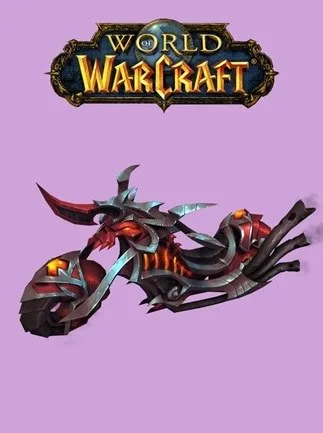
World of Warcraft: Hateforged Blazecycle (PC) - Battle.net Key - GLOBAL
Region — Global key — no region restriction, activates in every country.
 Can be activated in United States
 Windows
Buy World of Warcraft: Hateforged Blazecycle (PC) - Battle.net Key - key
World of Warcraft: Hateforged Blazecycle - Battle.net Key
Ignite the Skies with Fiery Fury
Unleash the power of the Shadowlands with the Hateforged Blazecycle, a stunning ground mount available for your World of Warcraft characters. This Battle.net key grants access to this unique mount on your global World of Warcraft account.
Key Features: Region: Global - Redeemable on any World of Warcraft account worldwide. Platform: Battle.net - Seamless integration with your existing World of Warcraft installation. Exclusive Mount: The Hateforged Blazecycle is a visually striking mount, boasting a distinctive fiery aesthetic. Account-Wide: Once redeemed, the Hateforged Blazecycle is accessible by all characters on your World of Warcraft account. Enhanced Mobility: Traverse the vast landscapes of Azeroth and beyond with increased speed and style.
Value Proposition: The Hateforged Blazecycle offers a unique opportunity to enhance your World of Warcraft experience. Show off your individual style and travel in unparalleled style with this coveted mount. Add it to your collection today!
Redemption Instructions: Log in to your Battle.net account. Navigate to the 'Games' tab. Select 'Redeem a Code'. Enter the provided Battle.net key. Follow the on-screen instructions to claim your Hateforged Blazecycle. The mount will appear in your in-game mount collection.
Important Information: Requires a World of Warcraft subscription to use. This is a digital product; no physical item will be shipped. This key is only valid for redemption on the Battle.net platform. The Hateforged Blazecycle is a ground mount and cannot fly in areas where flying is permitted.
How to activate World of Warcraft: Hateforged Blazecycle (PC) - Battle.net Key - on Battle.net
- 01
Buy & receive your code
Complete checkout — your code lands in your inbox in ~30 seconds, and is always available under Orders in your Gameplug account.
- 02
Open your Account Overview
Sign in at account.battle.net and find the "Redeem a Code" box (desktop app: profile icon → "Redeem Code").
- 03
Enter your code
Click Redeem Code — the game, Balance or Game Time attaches to your Battle.net account.
Code not working? Contact support — confirmed-invalid codes are replaced or refunded.







