

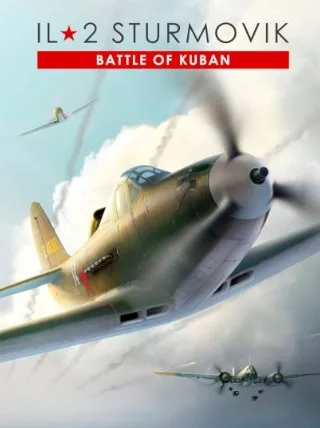
IL-2 Sturmovik: Battle of Stalingrad - Battle of Kuban (PC) - Steam Key - GLOBAL
Region — Global key — no region restriction, activates in every country.
 Can be activated in United States
At a glance
- Region
- GlobalCheck region restrictions
- Platform
- PC
- Format
- Digital keyGenuine & region-checked
- Delivery
- Instant deliveryEmailed in ~30 seconds
- Works on
Windows
Buy IL-2 Sturmovik: Battle of Stalingrad - Battle of Kuban (PC) - Steam Key - key
IL-2 Sturmovik: Battle of Stalingrad - Battle of Kuban (PC)
Experience intense aerial combat over the Eastern Front with the IL-2 Sturmovik: Battle of Stalingrad - Battle of Kuban expansion! This Steam key grants access to the complete Battle of Kuban content within the IL-2 Sturmovik: Battle of Stalingrad base game (sold separately).
Key Features:
New Theater of War: Engage in historical operations over the Kuban peninsula, a crucial battleground in 1943. Extensive Aircraft Roster: Fly a wide array of meticulously modeled aircraft, including iconic fighters, attackers, and bombers from both the Soviet and German air forces. Key aircraft include: Soviet: La-5FN, Yak-7B series 36, IL-2 AM-38 (1943), P-39L-1 Airacobra German: Bf 109G-4, Bf 109G-6, He 111 H-16 Detailed Environments: Fight over accurately recreated landscapes, featuring diverse terrain from coastal areas to mountainous regions. Realistic Flight Model: Experience a challenging and authentic flight simulation based on historical data and engineering principles. Multiple Game Modes: Participate in single-player campaigns, multiplayer battles, and cooperative missions. Authentic Damage Modeling: Witness realistic damage effects on aircraft based on impact locations and projectile types.
System Requirements (Minimum):
OS: Windows 7 / 8 / 10 (64-bit) Processor: Intel Core i5 760 / AMD FX-4300 Memory: 4 GB RAM Graphics: GeForce GTX 660 / Radeon HD 7770 with 2 GB VRAM or better DirectX: Version 11 Network: Broadband Internet connection Storage: 30 GB available space
Activation:
This is a Steam key. To activate, you will need a Steam account and the Steam client installed on your PC.
Launch the Steam client software and log into your Steam account. Click the "Add a Game..." menu item at the bottom-left of the Steam window. Choose the "Activate a Product on Steam..." option. Follow the onscreen instructions to complete the process.…
How to activate IL-2 Sturmovik: Battle of Stalingrad - Battle of Kuban (PC) - Steam Key - on Steam
- 01
Buy & receive your code
Complete checkout — your code lands in your inbox in ~30 seconds, and is always available under Orders in your Gameplug account.
- 02
Open Steam
In the Steam app: "+ Add a Game" (bottom left) → "Activate a Product on Steam..." (or use the web link below).
- 03
Enter your key
Paste the key (format XXXXX-XXXXX-XXXXX) and accept the Steam Subscriber Agreement.
- 04
Install & play
The game joins your library permanently — install it on any machine you sign in to.
Code not working? Contact support — confirmed-invalid codes are replaced or refunded.







