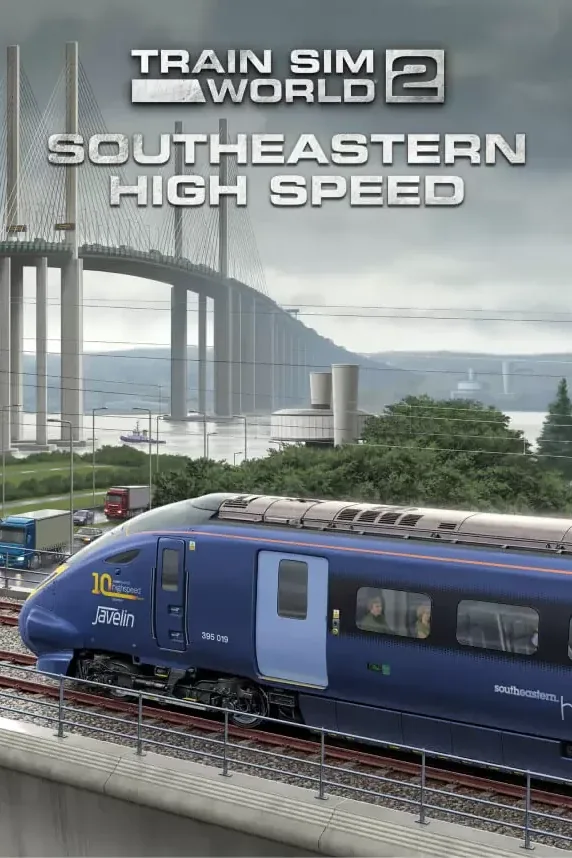
Train Sim World 2: Southeastern High Speed: London St Pancras - Faversham Route Add-On
Region — Works worldwide — no region restriction.
 Can be activated in United States
 Windows
Screenshots & trailer
Buy Train Sim World 2: Southeastern High Speed: London St Pancras - Faversham Route Add-On key
Experience the unique and exciting blend of classic main line running and thrilling high-speed commuting, aboard state-of-the-art motive power, in London and the Garden of England with Train Sim World 2: Southeastern High Speed.
The Chatham Main Line dates back to the 1860s, and has since its inception provided a link between the Medway towns and London. However, the call for faster journey times was answered in 2009, when Southeastern commenced operating domestic high-speed services on the newly built High Speed 1 route. For the past decade, services have been racing from the nation’s capital to Ebbsfleet, from where they join the classic lines and serve Gravesend, Medway and beyond.
It’s your job to take charge of these vital services; whisk commuters across the route, master the TVM430 signalling system on HS1, and keep an eye on more traditional signals on the classic lines.
Take control of the striking BR Class 395 EMU, adorning 10th anniversary branding commemorating the first decade of operation, as well as the colourful #Trainbow variant which celebrates Pride, on services between London and Faversham, including power changeovers at Ebbsfleet. Alternatively, get a taste of classic commuting from the cab of the popular BR Class 375 EMU.
Choose how you want to play; drive trains, ride around as a passenger, complete the route tasks, or simply pick a vantage point and watch the action unfold. Create your own experiences with the Scenario Planner and Livery Designer. Whatever you choose to do, there's lots to see and experience in Train Sim World 2: Southeastern High Speed.
Key Features
• 51-mile (82 km) route from London St Pancras to Faversham
• BR Class 395 EMU in Southeastern Highspeed ‘10th Anniversary‘ and ‘#Trainbow‘ liveries
• BR Class 375/9 EMU in Southeastern Dark Blue livery
• Highly detailed, feature-rich, driving cabs with accurate true-to-life performance and handling…
How to activate Train Sim World 2: Southeastern High Speed: London St Pancras - Faversham Route Add-On
- 01
Buy & receive your code
Complete checkout — your code lands in your inbox in ~30 seconds, and is always available under Orders in your Gameplug account.
- 02
Open PC
Launch PC and find "Activate a product" / "Redeem code" in the account or store menu.
- 03
Enter your key
Paste the key — the product is added to your library instantly.
Code not working? Contact support — confirmed-invalid codes are replaced or refunded.
All sellers
What our customers say
You might also like